

Home › Solutions › Lead management software
Lead management software that makes sure every lead gets a reply
Capture every lead automatically, see who is hot, and follow up on time by email, text or WhatsApp, all from one Command Centre.
14-day free trial · No card needed · Cancel any time · From £29 a month for your whole business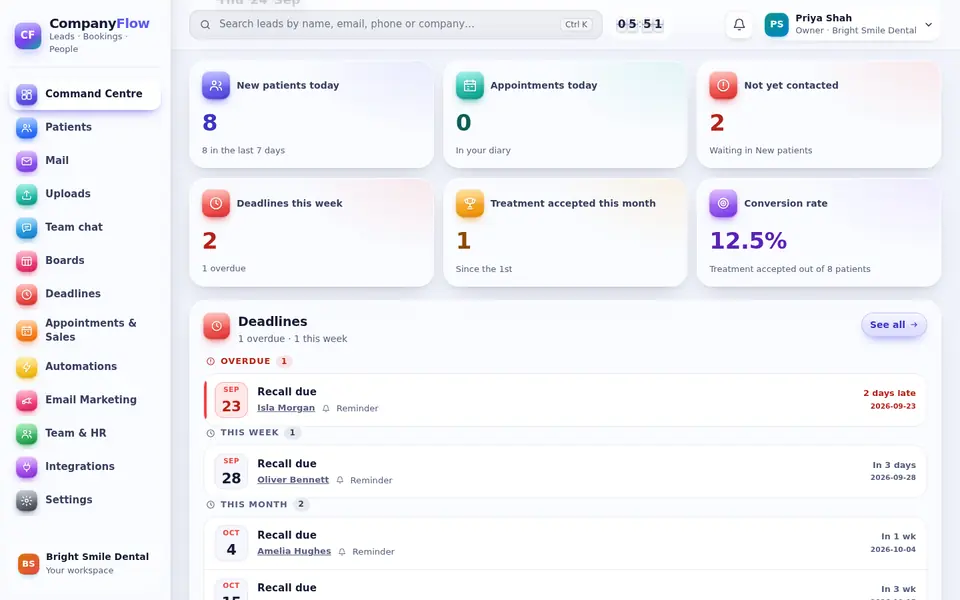
Capture leads from everywhere
Leads from your website forms, Facebook and Instagram lead ads, Google Ads lead forms, live chat and Zapier or Make land in one list, with their source recorded.
- Website form builder and embed code
- Facebook, Instagram and Google lead forms
- Duplicate warnings before you add the same person twice
Know who to call first
Lead scoring marks each lead hot, warm or cold from what they do, so your team starts with the people most likely to buy.
- Hot, warm and cold scores
- Saved lists and filters
- Bulk actions on many leads
Reply fast, automatically
Send an instant reply to new leads, then follow-up sequences by email, text and WhatsApp that stop when the lead replies or books.
- Automatic first reply
- Follow-up sequences
- Reminders and tasks for staff
See which ads and posts bring real enquiries
The source and campaign are saved on every lead, including the UTM tags on your links and the pages they read before enquiring, so you can compare channels by enquiries rather than clicks.
- Source and campaign on every lead
- Pages viewed before enquiring
- Reports by source and by month
Built for the whole team
Give each lead an owner, share notes and the full conversation history, and let staff update leads from their phone between appointments.
- An owner for every lead
- Roles and permissions for each person
- Phone app for iPhone and Android
Move from a spreadsheet in minutes
Upload a CSV of your current leads, match the columns and check the preview. If anything looks wrong you can undo the upload, and you can export everything again at any time.
- CSV import with a preview
- Undo an upload
- Export your data at any time
Spreadsheet or lead management software?
Most small businesses start with a spreadsheet or a WhatsApp group. This is what changes when leads have a proper home.
| Spreadsheet | CompanyFlowHQ | |
|---|---|---|
| New leads | Copied in by hand | Added automatically from forms, ads and chats |
| First reply | When someone remembers | Sent automatically, straight away |
| Follow-up | Easy to forget | Reminders and sequences that stop when they reply |
| Who is handling it | Often unclear | One owner and the full history on each lead |
| Where it came from | Usually unknown | Source and campaign saved on every lead |
| Duplicates | Easy to miss | A warning before you add the same person twice |
Questions
Which lead sources can I connect?
Your own website forms, Facebook and Instagram lead ads, Google Ads lead forms, live chat, WhatsApp, email, and anything Zapier or Make can send.
Can my whole sales team use it?
Yes. Every plan includes unlimited staff, with roles and permissions so everyone sees the right leads.
Do automations need setting up from scratch?
No. Ready-made sequences are installed switched off; you check the wording and switch them on.
How is this better than a spreadsheet?
A spreadsheet only holds what someone types in. Lead management software adds leads for you, replies straight away, reminds your team to follow up and records where each lead came from.
Can I see which ads and posts bring leads?
Yes. The source and campaign are saved on every lead, including UTM tags from your links, so you can compare channels by real enquiries.
Does it work on a phone?
Yes. Staff can see and update leads in the CompanyFlowHQ phone app for iPhone and Android.
Try CompanyFlowHQ free
14-day free trial · No card needed · Cancel any time